Simple, Transparent Pricing
Start free for 30 days. No charges until your trial ends. Cancel anytime.
Picly is a one-way photo collection tool built for professionals. You create a project, share a link or QR code, and photos come directly to you, organized by session and ready to review. Your clients, attendees, and team members need no account, no app, and no login. Just tap, upload, and done.
How to Choose A Plan
Think about how many pictures are shared with you in a given month, or how many WOULD be shared once you’re using Picly as your sharing tool.
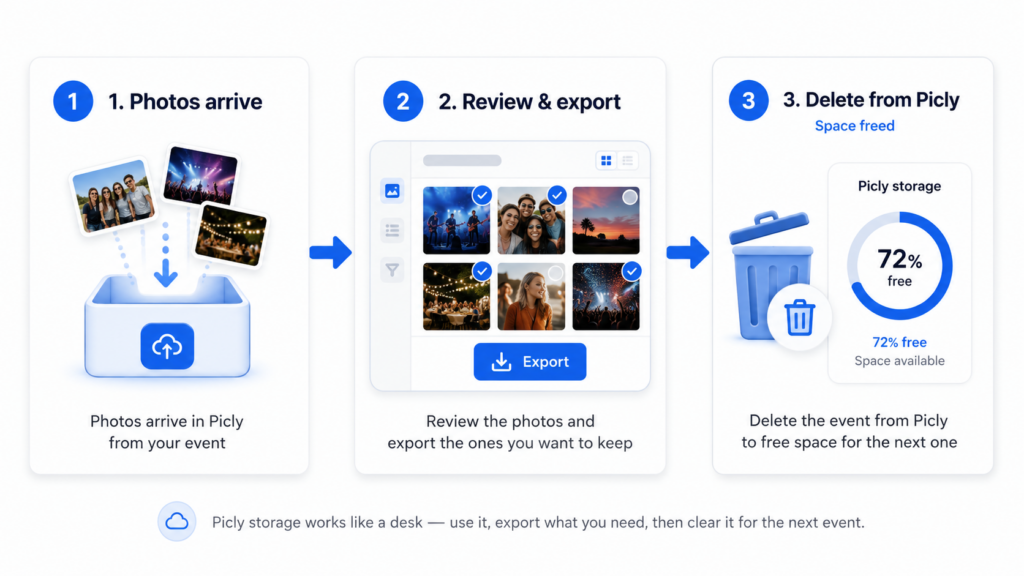
Your Picly account is not a permanent storage space for photos that keeps on growing. It is a pass-through account that constantly receives shared photos, while at the same time you are deleting old projects once you have downloaded the project pictures or transferred them to your Google Drive.
A Real-World Example: How Far Does 10 GB Actually Go?
A typical iPhone photo is around 6 MB. Picly also stores a small preview thumbnail, so plan for roughly 6 MB per photo stored in your account (thumbnails add only a small fraction on top).
- You have a very busy month - 8 active projects, each collecting 30 upload sessions of 20 photos. That's 4,800 photos and roughly 29 GB of new content flowing through your account over the month.
- You clean up about once a week - download or transfer finished sessions to Google Drive and delete them from Picly. At any given moment, about 7 days of sessions are sitting on your "desk" waiting to be processed.
- Your average storage at any one time: ~60 user upload sessions × 20 photos × 6 MB = roughly 7 GB - about 70% of the Plus plan's 10 GB limit.
If you will have more projects, more sessions, or more photos, that’s when the Pro plan’s 30 GB gives you comfortable breathing room without having to watch the clock. Higher-volume operations that keep sessions around longer will naturally fit better on a larger plan.
But your plan will never be cut off for uploading. If your average daily content size goes over your plan amount, we will simply charge you a nominal fee for the overage. If it is a sign that your needs are increasing, simply upgrade your plan. If not, then keep your plan and only pay the small overage charge for super-busy months.
How Storage & Overages Work
We never block incoming photos, not even if you’re over your storage limit. Here’s exactly how billing works.
Your Monthly Storage Allowance
Each plan includes a storage allowance that covers originals and thumbnails of every photo stored in Picly. ZIP files are temporary and do not count toward your limit.
If your average daily stored total goes over your plan’s allowance during the month, the excess gigabytes are billed at your plan’s overage rate on your next invoice. That’s it.
A Real-World Example
Plan
Storage used this month
Overage (2.5 GB x $2.80)
Total for the month
Plus – 10 GB @ $19.95/mo
12.5 GB
$7.00
$26.95
A Real-World Example
Plan
Storage used this month
Overage (2.5 GB x $2.80)
Total for the month
Plus – 10 GB @ $27.95/mo
12.5 GB
$7.00
$34.95
Plus
-
10 GB included storage
-
Unlimited projects & upload links
-
No-account uploading for your clients
-
ZIP downloads & Google Drive transfer
-
$2.80/GB overage (never blocked)
Pro
-
30 GB included storage
-
Unlimited projects & upload links
-
No-account uploading for your clients
-
ZIP downloads & Google Drive transfer
-
$1.60/GB overage (never blocked)
Premium
-
90 GB included storage
-
Unlimited projects & upload links
-
No-account uploading for your clients
-
ZIP downloads & Google Drive transfer
-
$0.89/GB overage (never blocked)
Plus
-
10 GB included storage
-
Unlimited projects & upload links
-
No-account uploading for your clients
-
ZIP downloads & Google Drive transfer
-
$2.80/GB overage (never blocked)
Pro
-
30 GB included storage
-
Unlimited projects & upload links
-
No-account uploading for your clients
-
ZIP downloads & Google Drive transfer
-
$1.60/GB overage (never blocked)
Premium
-
90 GB included storage
-
Unlimited projects & upload links
-
No-account uploading for your clients
-
ZIP downloads & Google Drive transfer
-
$0.89/GB overage (never blocked)
If you think your needs will exceed the Premium option, please contact us at [email protected] to discuss custom pricing.
Plus
-
10 GB included storage
-
Unlimited projects & upload links
-
No-account uploading for your clients
-
ZIP downloads & Google Drive transfer
-
$2.80/GB overage (never blocked)
Pro
-
30 GB included storage
-
Unlimited projects & upload links
-
No-account uploading for your clients
-
ZIP downloads & Google Drive transfer
-
$1.60/GB overage (never blocked)
Premium
-
90 GB included storage
-
Unlimited projects & upload links
-
No-account uploading for your clients
-
ZIP downloads & Google Drive transfer
-
$0.89/GB overage (never blocked)
Plus
-
10 GB included storage
-
Unlimited projects & upload links
-
No-account uploading for your clients
-
ZIP downloads & Google Drive transfer
-
$2.80/GB overage (never blocked)
Pro
-
30 GB included storage
-
Unlimited projects & upload links
-
No-account uploading for your clients
-
ZIP downloads & Google Drive transfer
-
$1.60/GB overage (never blocked)
Premium
-
90 GB included storage
-
Unlimited projects & upload links
-
No-account uploading for your clients
-
ZIP downloads & Google Drive transfer
-
$0.89/GB overage (never blocked)
If you think your needs will exceed the Premium option, please contact us at [email protected] to discuss custom pricing.
Keep Your Bill Consistent - Delete Completed Projects
Once you’ve downloaded or transferred a session’s photos to Google Drive, you no longer need those files sitting in Picly. Deleting old sessions and projects frees up that storage immediately. Many users archive completed work regularly to stay comfortably within their plan, keeping their monthly cost predictable and avoiding overages entirely.
FAQ
No. Sign up with just your name and email and get 30 days of full access with up to 10 GB of storage. When you’re ready, choose a plan from your Billing page.
No. Uploaders visit your link or scan your QR code, choose their photos, and hit submit. No Picly account, no app download, no extra steps.
Full access to every feature on the Plus plan with a 10GB limit for the trial. No credit card required. Upgrade if you enjoy Picly!
A shared album lets everyone see everyone else’s photos. Picly is one-way. Photos flow to you, organized and private. Your uploaders can’t browse other submissions. It’s a professional collection tool, not a gallery.
JPEG, PNG, HEIC, and HEIF. Up to 20 photos per session, up to 20 MB each. Video files up to 90 seconds can be uploaded as well. File types are verified server-side, not just by file extension.
Yes. When you connect your Google account, you can choose any folder in your personal Drive or any Shared Drive you have access to. The transfer happens in the background, you don’t need to wait around.
You’re never blocked. Uploads continue uninterrupted (for paid accounts). At the end of the month, any overage is calculated and added to your next invoice at your plan’s per-GB rate. Or you can simply upgrade your account if needed.
Once you’ve downloaded or transferred your photos to Google Drive, delete the session from Picly. That storage is freed immediately. Many users archive completed projects routinely to stay within their plan, keeping their monthly bill consistent.
Ready to stop chasing photos?
Join social media managers, event organizers, and businesses who use Picly to collect photos effortlessly.